Build Helper overview
Build Helper is the Flutter build-and-release cockpit in Mobile DevTools. It finds the Flutter apps on your machine and gives you one screen to switch an app’s environment, bump its version, build APK / AAB / IPA, and ship the result to testers or the stores.
It runs entirely on your machine at http://localhost:4095. There is no login, no account, and no server — just a local dashboard.
Who it’s for
Section titled “Who it’s for”Mobile teams who release the same app across several environments (dev / demo /
qa / prod) and are tired of hand-editing version numbers, remembering the right
flutter build flags, and uploading bundles by hand. If you build a Flutter app
more than once a week, this replaces a folder full of shell scripts.
The core idea
Section titled “The core idea”Every release is the same short pipeline, and Build Helper runs it for you:
switch environment → write the version → build the artifact → distribute → record it.
You pick the environment, the version, and the artifacts; it does the rest and streams a live log while it works.
What you can do
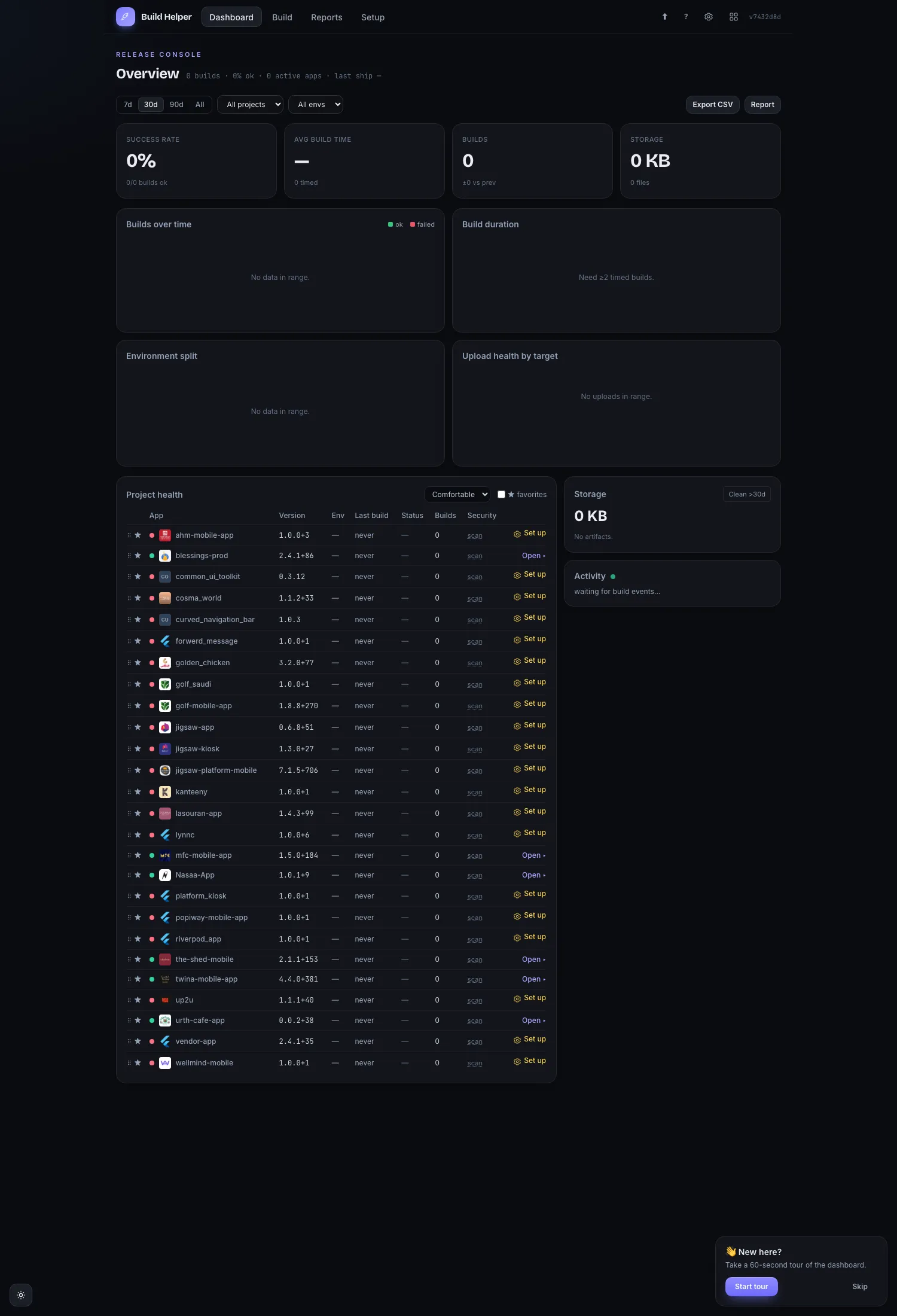
Section titled “What you can do”- See every app at a glance — a dashboard of the Flutter projects under your projects root, each with its detected environments, version, health, and last build.
- Switch environment — flip an app between dev / demo / qa / prod (it rewrites
the
AppModeconstant and swaps the matching Firebase config files). - Bump the version — set the version name and build number per environment, with the next build number pre-filled.
- Build — produce an APK, AAB, or IPA, with optional
clean/pub get/analyze/teststeps first. - Distribute — send builds to OneDrive, Firebase App Distribution, Google Play, and TestFlight.
- Sign Android releases — generate an upload keystore (or link one you have)
and wire
build.gradleautomatically. - Report — filter build history and export it as CSV or a printable PDF.
- Preflight your toolchain — a Doctor that checks Flutter, Xcode, CocoaPods, rclone, and the Firebase CLI, and installs the safe ones for you.
The main screens
Section titled “The main screens”Build Helper has four tabs plus a shared settings gear.
| Screen | What it’s for |
|---|---|
| Dashboard | KPI tiles and a grid of your apps. Click an app to open it. |
| Build | The core workflow: pick an app’s environment, version, artifacts, options, and distribution targets, then build with a live log. |
| Reports | Filter build history by date range and environment; export CSV or PDF. |
| Setup | The Doctor and the distribution connectors (OneDrive / Firebase / Google Play / Apple). |
| ⚙ (gear) | Shared settings — your profile, Slack/Telegram/email notifications, and issue trackers. Powered by platform-kit. |
Launch it
Section titled “Launch it”Build Helper is one of the tools in the Mobile DevTools hub.
- From the hub — run
node serve, open http://localhost:4090, and click Build Helper. - Standalone — run
node build-helper/server.jsand open http://localhost:4095 directly.
- Usage — a step-by-step walkthrough of a build.
- Features — every feature, in detail.
- Signing & distribution — set up keystores and each distribution channel.
- Troubleshooting — common problems and fixes.